HackCU 12
I plan to graduate from Mines with my bachelor's this December, which means HackCU 12 will be my last time competing at CU Boulder's annual hackathon. This time, it was just Renn, Ronald, Sushruth, and I. The event took place over the weekend of March 7 and 8, 2026.
Renn and I had been discussing ideas a while beforehand, so we knew what we wanted to make before we started. Explaining it to our teammates, though, made us realize it was difficult to understand our project, and of course, it's harder to explain something like this in writing than in person, but I'll still try!
An avid cuber, Renn owns a couple Bluetooth-enabled Rubik's cubes that inform a computer when and how they are moved. Our idea was to create a drag-and-drop coding environment like Scratch but with special blocks with built-in cube integration. We'd also handle networking to allow our users to code multiplayer games.
"Scratch but with extra blocks" makes it sound easy. But when you think about it, we were essentially trying to
- create our own programming language and sandbox its runtime environment
- reverse engineer a third-party protocol over Bluetooth
- create a networking platform that works with our synchronous-only language
- make a UI for all of that
As we discovered, this is a lot to do in 24 hours. Let's get into it.
Before the hackathon
Ronald graciously offered to drive us in his car. We arrived at the venue and signed up, during which process we acquired some cool stickers and shirts for tie-dye. (I chose to keep mine white. It looks pretty good that way.)
Renn and I found a secluded room with windows allowing sunlight and fresh air to enter. This is a pretty rare find at a hackathon, so we claimed the space by setting up our laptops. Then, even though I'd already had breakfast, I was struck by my perpetual hunger, so Renn and I went to the nearby Arabesque cafe. Like most food in Boulder, our meals were expensive but tasty.
First steps
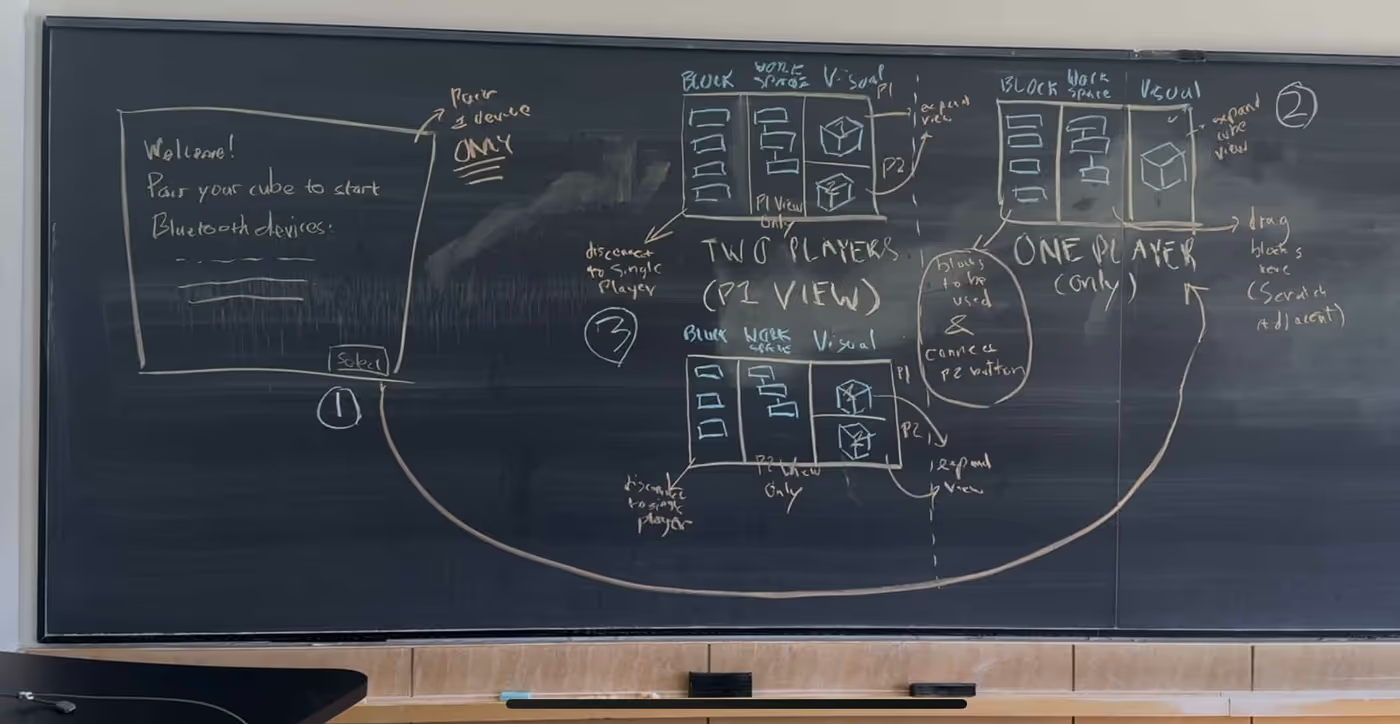
Our idea wasn't quite clear in our heads at the time, so we spent some time nailing down details and thinking about the UI and UX. It also took a while to set up our development environments. We wanted to build our app with Wails, whose dependencies must be installed one by one on Windows machines. Ever since I switched to NixOS, I've started to believe that project-specific environments are a necessity for modern development, and this experience affirmed that. While the Windows users scrolled through documentation, fumbled with paths, and slammed into arcane WSL errors, I simply created a Nix flake. I still don't really get how flakes work (does anyone?), but my primary use for them is basically as a list of dependencies. Then, typing
nix develop
drops you in a shell with all the dependencies installed. You can adjust versions and such; it's possible for different projects to have different versions of the same dependency.
OK, enough raving about Nix. With the environments set up, Sushruth started making a frontend while Renn started working on translating Bluetooth signals to something our program could understand. I wrote a data structure to represent the state of a cube. The hard parts were already done for me by the TwoPhaseSolver library, whose authors had figured out that there are two best ways to represent a cube state: one superior for visualization and the other designed to be computationally efficient to solve. I chose the first and manually transpiled the types to Go:
type Orientation byte

const (
	U Orientation = iota
	R
	F
	D
	L
	B
)

/*
A cube definition string "UBL..." means for example: In position U1 we
have the U color, in position U2 we have the B color, in position U3 we
have the L color, etc.
             |************|
             |*U1**U2**U3*|
             |************|
             |*U4**U5**U6*|
             |************|
             |*U7**U8**U9*|
             |************|
|************|************|************|************|
|*L1**L2**L3*|*F1**F2**F3*|*R1**R2**R3*|*B1**B2**B3*|
|************|************|************|************|
|*L4**L5**L6*|*F4**F5**F6*|*R4**R5**R6*|*B4**B5**B6*|
|************|************|************|************|
|*L7**L8**L9*|*F7**F8**F9*|*R7**R8**R9*|*B7**B8**B9*|
|************|************|************|************|
             |************|
             |*D1**D2**D3*|
             |************|
             |*D4**D5**D6*|
             |************|
             |*D7**D8**D9*|
             |************|
*/
type CubeState [54]Orientation
One capability we wanted for our interface was to set a target cube state and then show the user what moves to make in order to make the physical cube match the target state. To do this, we'd need to know the shortest set of moves between any two possible states, which we used the TwoPhaseSolver library for.
How do you call a Python library from Go? If we were making a production app,
we'd probably transpile the whole library. If we were pedantic, we'd embed the
Python interpreter using cgo. But we were neither; we were pragmatic. So we
used Go's os.exec.Command to call a short Python script and then parse stdout
into our data structure.
Seems quick and dirty? It was certainly dirty, but not at all quick. Even with
the wonderful uv, Python dependency
management is still hard, and combining it with NixOS lost me far more time
than I'd gained over the Windows users with the other dependencies. Oh, and for
performance reasons, we decided to use PyPy, which made it
even worse. I haven't taken the time to fully understand uv. uv pip install rubiktwophase seemed to add the library to the virtual environment for Python,
but not for PyPy. I didn't want to install anything globally because I'm fussy
about project-specific dependencies. After an embarrassingly long time
struggling, I found a solution: make PyPy look in the virtual environment by
setting the following environment variable:
PYTHONPATH='.venv/lib/python3.13/site-packages'
To get this working on someone else's computer, they'd still have to uv sync
their dependencies, source the venv, then set the environment variable.
Thankfully, NixOS flakes let you set environment variables in your development
shell, so once I set that up, all I had to do was nix develop like before. Yet
another win for the superior Linux distribution.
Getting in the weeds
Eventually, we had to figure out how the networking was going to work. I've had some experience using WebSockets for a game I wrote a while ago, so that helped a little bit. When making that game, I tried different things, such as having clients broadcast their data and having everyone believe them, or trying to sync state between the server and the client. Eventually, I decided this was bad, and the best way was to make the server the single source of truth and the executor of all the business logic. The "dumb" clients are only user interfaces that visualize the data the server sends them. Additionally, networking and business logic should be strictly separated. A corollary is that for a client's own change to be displayed on its screen, the change needs to make a round trip to the server first. We didn't follow exactly this architecture, but took some inspiration from it. These problems are hard to think about, so this took a while. It was one of the most enjoyable parts of the hackathon for me.
We wanted a quiet place to think, so we found a different abandoned room and began to draft more diagrams of our network design. This forced us to think about what capabilities we'd like to implement and how those capabilities informed our decisions. Turns out, designing a programming language is hard. We began to realize that our project was, in fact, very ambitious. There was so much to implement, and it was already past midnight!
To implement our Scratch-like programming interface, we turned to Google's
Blockly library. The nice thing is
this did most of the hard parts for us. However, we still had to manually
implement logic for every block we wanted to add. Asynchronous blocks
especially were difficult to think about since the JavaScript that Blockly
outputs doesn't support any async primitives. I didn't know it at the time, but
the code is run using a library called JS-Interpreter which sandboxes
everything in a pseudo-virtual machine. But something about the said virtual
machine means it doesn't have its own event loop? or something like that, which
means you can't use JavaScript Promises.
As I'm sure my readers can tell, I didn't understand how any of this works, so I threw my hands in the air and asked Codex. It outputted working code. This was, in retrospect, a bad idea because I never really understood this part of our codebase. Understanding what you're doing pays dividends, and not understanding what you're doing incurs debt—debt with a horrible interest rate.
A random note, because I don't know where else to put it: Renn used mDNS to find other computers on the same Wi-Fi network to connect to. This worked amazingly well, even on the CU Guest network. It seems like a neat protocol; I'll have to explore it further some day.
How do you debug when you don't have error messages?
We ran into an odd segfault with no meaningful error. It said signal 11
mumble mumble something something followed by several hundred lines of
unhelpful stack traces. We had no idea where to even start trying to find what
was causing this. Eventually, I ran across a GitHub issue (that I can't seem to
find any more) that explained that any nil pointer dereference in your code
will be swallowed by Wails into this unhelpful error message. The only way to
find it? Adding log statements everywhere and seeing what the last one printed
before the crash is.
This made finding any error vastly slower than it had to be. Several times we'd run into this and have to start racking our heads for where in the codebase something could be made nil.
We found one very specific instance of this bug that was especially difficult to debug. Recall that we had two Bluetooth Rubik's cubes and two laptops, connected over WebSockets. In our architecture, one of the computers was considered the host. When Renn hosted and I joined, and when he moved his cube, my program would panic and show the 500-line traceback. This didn't happen when I hosted, or when I moved my cube.
This was a blocker for our entire team, so Renn and I got together and started debugging. We added massive swaths of log statements. Sometimes the statements appeared to be inconsistent. It must be a race condition, we wondered, or something in a Goroutine running concurrently?
All of a sudden, it got even more confusing. Previously, the program had worked when in "single-player" mode. But now, it wasn't responding to our cubes. Our cube networking logic had just…stopped working? But sometimes it did work, albeit with a 10- or 20-second delay.
At last, we realized: the cube we thought was connected to Renn's computer was actually connected to my computer, and vice versa. No wonder it didn't respond!
With this out of the way, we were able to go back to the original error, the inexplicable segfault upon turning a cube while connected over the network. As you'll recall, it had taken us more than an hour just to discover that this was a nil pointer dereference. Eventually, we managed to find a consistent set of log statements before the crash. But we looked at the supposed culprit function, and found ourselves scratching our heads: How could this possibly segfault?
func (c *Client) SendMoveEvent(move cubeengine.Move) error {
	defer func() {
		if r := recover(); r != nil {
			log.Println("Recovered in SendMoveEvent", r)
		}
		log.Println("somehow, someway, it hasn't panicked yet.")
	}()
	log.Println("beginning of SendMoveEvent")
	serverMessage := server.ServerMessage{
		MessageType: server.Move,
		MoveMessage: server.MoveMessage{
			Move: move,
		},
	}
	log.Println("sanity check 1")

	var buf bytes.Buffer
	err := gob.NewEncoder(&buf).Encode(serverMessage)
	log.Println("sanity check 2")
	if err != nil {
		log.Println("the message returned an error:", err)
	}
	log.Println("sanity check 3")

	bts := buf.Bytes()
	log.Println("sanity check 4", c.conn)
	err = c.conn.WriteMessage(
		websocket.BinaryMessage,
		bts,
	)
	log.Println("wrote message")
	if err != nil {
		log.Println("the message returned an error:", err)
	}
	return err
}
All the sanity checks you see are the lines of logging we kept adding to find the exact line causing the issue. Calling it a check for sanity was apt; I was certainly beginning to question mine.
Eventually, we discovered that elsewhere in the code, c.conn was set to nil
when the WebSocket client disconnected. But how could it have disconnected? Our
laptops weren't having any connectivity issues.
We decided to ping each other's IP addresses. We ran ip a and pinged each
other, and it worked. To double-check that our program was connecting to the
same host, we logged the IP address we connected to, which revealed something
odd: the addresses printed by ip a weren't the same as the addresses printed
by our program's logging statements.
The address we saw, in fact, was not the address assigned to Renn's Wi-Fi card
but to a device called docker0.
Well, that would explain why we couldn't reproduce it the other way. I use Podman; I don't have the Docker daemon installed.
Stopping docker-daemon.service didn't fix it.pgrep -i docker | sudo xargs kill -9 didn't fix it.
But sudo dnf remove docker and a reboot fixed it.
I don't think I'll ever forget that bug.
Brief thoughts on agentic AI
Previously, I've been pretty anti-AI. I didn't think it was actually useful, and I also found it to be antithetical to learning, one of my primary motivations for pursuing a college degree. However, the last few months have forced me to begrudgingly admit that AI can be useful, and I'm going to have to learn it for my career. So, I've purchased a Codex subscription and have been trying to give it tasks to do. I don't know how to make it better. To get good code, I have to break every task up into small, well-described steps. Sometimes, bad output makes me realize that my instructions were ambiguous or that the idea in my head wasn't correct; that is, the act of describing the problem precisely can be helpful to code. Other times, though, it still feels like the technology is far from where so many engineers on Hacker News or elsewhere seem to think it is. Even when it works well, it only shaves off ten minutes of work here and there. It takes a while to write a sufficiently detailed prompt. I haven't even graduated college, yet I already feel like I am a much more capable engineer than Codex. I have much to learn before this tool is as useful to me as many engineers have told me it is useful to them.
As mentioned before, agents can be really helpful, especially for hackathons, where the maintainability of the code is unimportant. The issue is, even at a hackathon, understanding the code is important, and I attribute our missed goals to my lack of understanding. I feel like I must be doing something wrong, and I'm still questioning the technology itself. AI must require a lot of skill to use, given that a few weeks of prompting wasn't enough background to make the tools useful to me. But if agents are so powerful, shouldn't they be helpful even in the hands of someone new to agentic coding?
Uh oh, time is running low
The sun rose on a long to-do list, and our team realized we wouldn't finish
implementing everything by the deadline. Ronald and Sushruth produced our
DevPost submission (a video and write-up describing our project) and started
thinking about our presentation. Our project didn't work very reliably. There
was a race condition which Renn solved with a time.Sleep call whose parameter
seemed to grow ever larger. The cubes automatically turned off and disconnected
after a certain period of inactivity, at which point the only way of restoring
functionality was restarting the program. When we went to the judging room, we
discovered that the network syncing spawned in a corrupt state most of the
time. Unlike most hackathons, we presented to all our judges at once, and
during our one chance, the code execution part didn't work.
This outcome, though humbling, did not completely depress my spirits. I was still glad to do all the hackathon things which I always write about. It was fun to learn Wails, think about the networking, and dare I say it, experience debugging with no error messages. On the non-technical side, I enjoyed getting to know Renn, Ronald, and Sushruth better.
I'm grateful for the HackCU organizers, who enabled me to have a fun weekend in Boulder and make some more college memories before graduating. This was one of the most smoothly run hackathons I've been to. Good work, y'all!